How to use promo codes on Lululemon
· Get on your browser and google the official website of Lululemon. Type in your wanted list of their must-have products and click on the thumbnail.
· Once you get to the product page, you will find more product details. You may want to look through other products before your final decision. So, click "BACK" on your browser to go back and see more. If satisfied, select specific product information, like the size, quantity, etc. Proceed to click on "ADD TO BAG." This should be followed by a pop-up window showing the added product(s) information.
· Click "VIEW BAG" to confirm the items on your cart, or click ''CHECKOUT'' to begin the checkout process. Alternatively, close the window to continue shopping by clicking the "X" sign found at the top right corner. When done shopping, click the small cart icon in the top right of the page to start the checkout procedure.
· You will be redirected to another page. Here, fill in your shipping and contact details and click "REVIEW AND PAY." Log in if you have a Lululemon account. Still, your Google, Yahoo, or Facebook accounts work just fine.
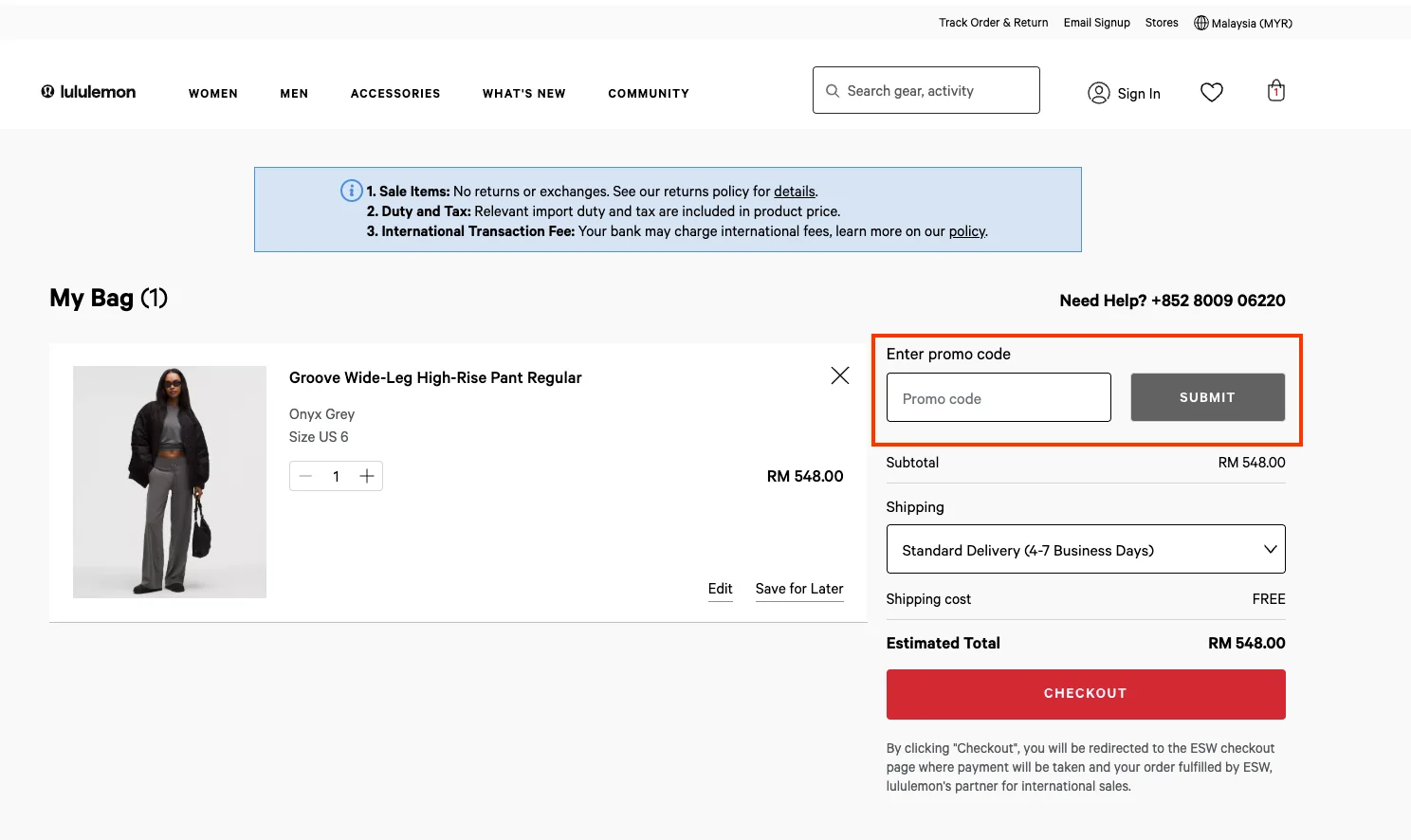
· On the order summary section, fill in your Lululemon discount code in the textbox with "ENTER YOUR PROMO CODE" and click "APPLY." A new product(s) price will show up.

· Complete your payment with the available method. You should receive a confirmation email if the items are ordered successfully.
· Now, sit back and wait for your Lululemon product(s) to arrive as stated in your order.